

Streamlit
Streamlit is a Python library that enables the simple creation of web apps.
A video walkthrough can be found below:
Introduction
Section titled “Introduction”There is no direct connection to DuckDB from any Apache Kafka-compliant service. However, a DuckDB plug-in named Kwack provides this ability. This guide will explain how to connect the two systems together to allow you to perform analytics on your WarpStream-managed Topics.
Prerequisites
Section titled “Prerequisites”- Have Python 3.x or later installed
- Have the Streamlit Python library installed:
pip install streamlit - Have Confluent Kafka Python library installed:
pip install confluent_kafka - WarpStream account - get access to WarpStream by registering here.
- A Serverless WarpStream cluster is up and running with a populated topic.
Step 1: Python Code
Section titled “Step 1: Python Code”The following Python program can be used as is. It will present a web page that will:
- Prompt for your cluster credentials
- Ask for a number of records to display
- Present a list of available topics
- Print out the requested number of records from the topic
import streamlit as stfrom confluent_kafka import KafkaException, KafkaError, Consumerfrom confluent_kafka.admin import AdminClient
# Streamlit UI for user inputsst.title("WarpStream Topic Consumer")username = st.text_input("SASL Username", value="")password = st.text_input("SASL Password", value="", type="password")bootstrap_servers = st.text_input("Bootstrap Servers:Port", value="")
# Prompt the user for the number of records to readnum_records = st.number_input("Number of records to read", min_value=1, step=1, value=10)
# Submit button to connect to Kafka and fetch topicsconnect_button = st.button("Connect to WarpStream")
# Initialize session state for topics and selected topicif 'available_topics' not in st.session_state:    st.session_state.available_topics = []if 'selected_topic' not in st.session_state:    st.session_state.selected_topic = None
# Function to create Kafka AdminClient to fetch topicsdef get_kafka_topics(username, password, bootstrap_servers):    conf = {        'sasl.mechanism': 'PLAIN',        'bootstrap.servers': bootstrap_servers,        'security.protocol': 'SASL_SSL',        'sasl.username': username,        'sasl.password': password,        'socket.timeout.ms': 10000,   # Increase socket timeout        'metadata.request.timeout.ms': 15000,  # Increase metadata request timeout    }
    try:        admin_client = AdminClient(conf)        topics_metadata = admin_client.list_topics(timeout=15)  # Increase timeout here too        topics = list(topics_metadata.topics.keys())        st.success("Successfully fetched topics!")        return topics    except KafkaException as e:        st.error(f"Failed to fetch Kafka topics: {e}")        return []
# Function to consume a specified number of messages from the selected topicdef consume_messages(username, password, bootstrap_servers, topic, num_records):    conf = {        'sasl.mechanism': 'PLAIN',        'bootstrap.servers': bootstrap_servers,        'security.protocol': 'SASL_SSL',        'sasl.username': username,        'sasl.password': password,        'group.id': 'streamlit-consumer',        'auto.offset.reset': 'earliest'    }
    consumer = Consumer(conf)    consumer.subscribe([topic])
    messages = []    try:        for _ in range(num_records):            msg = consumer.poll(timeout=10.0)  # Increase poll timeout to 10 seconds            if msg is None:                st.warning("No more messages found after waiting.")                break            if msg.error():                if msg.error().code() == KafkaError._PARTITION_EOF:                    st.info("Reached end of partition.")                    break                else:                    st.error(f"Consumer error: {msg.error()}")                    break            messages.append(msg.value().decode('utf-8'))    except Exception as e:        st.error(f"Error while consuming messages: {e}")    finally:        consumer.close()
    return messages
# Handle the connect button clickif connect_button:    if username and password and bootstrap_servers:        st.session_state.available_topics = get_kafka_topics(username, password, bootstrap_servers)    else:        st.error("Please provide all required details.")
# Display the topics as radio buttons if topics are availableif st.session_state.available_topics:    st.session_state.selected_topic = st.radio("Select a topic", st.session_state.available_topics)    submit_button = st.button("Submit", disabled=not bool(st.session_state.selected_topic))
    # Handle the topic selection submit button    if submit_button and st.session_state.selected_topic:        st.write(f"Selected Topic: {st.session_state.selected_topic}")
        # Consume the specified number of messages from the selected topic        messages = consume_messages(username, password, bootstrap_servers, st.session_state.selected_topic, num_records)
        if messages:            st.write(f"First {num_records} messages from the topic:")            for i, message in enumerate(messages, start=1):                st.write(f"{i}: {message}")        else:            st.write("No messages found or unable to consume messages.")
Step 2: Run the app
Section titled “Step 2: Run the app”From the command line, the program can be run as follows:
streamlit run myapp.py
Next, open a web browser and paste in the following URL:
http://localhost:8501Which will present you with the following screen:
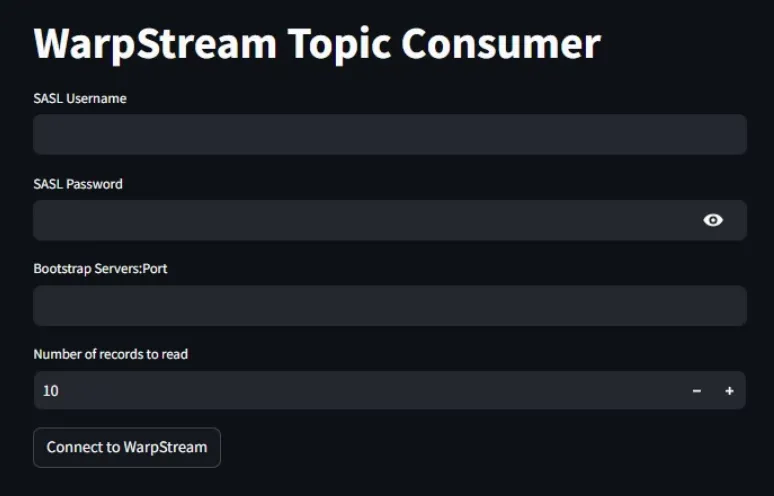
Enter the applicable information. If Topics are available, they will be displayed, and you can then preview records from them. This app is generic, so any valid set of credentials will connect and allow you to browse the topics and data in your cluster.
Next Steps
Section titled “Next Steps”Congratulations! You now have a general-purpose Streamlit app that will allow you to quickly peruse the structure and data in your WarpStream cluster.