

Partitions Auto-Scaler
This page describes the functionality of WarpStream's Partitions Auto-Scaler.
The partitions auto-scaler is a convenience feature that automatically scales the number of partitions in a topic to ensure that the average write throughput (uncompressed bytes per second) stays below a configured threshold. This enables the partition count to increase automatically with organic traffic growth so that operators don’t have to take manual actions or perform capacity planning.
For example, consider a topic called called “logs” with the following configuration values:
| Configuration | Value |
|---|---|
warpstream. |
true |
warpstream. |
2500000 |
warpstream. |
1024 |
The logs topic has 50 partitions and an average total throughput of 100 uncompressed MB/s. If we do the math then we’ll see that:
100/50 == 2MB/s/partition
which is below the limit of 2.5MB/s/partition. In this scenario, the partitions auto-scaler will take no action. However, if the total throughput increases to 250 uncompressed MB/s, then the throughput per partition will increase to:
250/50 == 5MB/s/partition
which is above the limit of 2.5MB/s. As a result, the partitions auto-scaler will detect this and begin adding additional partitions to the topic until the average throughput per partition falls back below 2.5MB/s (I.E once the topic reaches roughly 100 partitions).
The partitions auto-scaler can add partitions to a topic, but it can never remove them. As a result, it does not take action on every temporary spike in write throughput, and instead waits for throughput to exceeded the configured target consistently for a contiguous window of time (currently 15 minutes) before taking action.
The partitions auto-scaler is particularly convenient for workloads where WarpStream is being used as a highly scalable and cost-effective “pipe” where records with the same key don’t always need to be written to the same partition.
Caveats
Section titled “Caveats”- This feature is not suitable for any workloads where records with a specific key must always be written and consumed from the same partition. The reason for this is that in the Kafka protocol, record partitioning happens client side, so when the number of partitions in a topic increases, the destination partition for each record key will change.
- The partitions auto-scaler can increase the number of partitions in a topic, but it cannot decrease the number of partitions in a topic. The reason for this is that the Kafka protocol (and the domain model of Kafka itself) are such that it’s impossible to delete partitions from a topic with active producers/consumers in a safe manner. However, in the future we will solve this problem with WarpStream by creating “Virtual Topics” that abstract over multiple individual topics.
Configuration Options
Section titled “Configuration Options”All of the configuration options below are topic-level configuration values.
| Configuration | Description |
|---|---|
warpstream. |
Boolean value. Whether the partitions auto-scaler is enabled for this topic. Defaults to false. |
warpstream. |
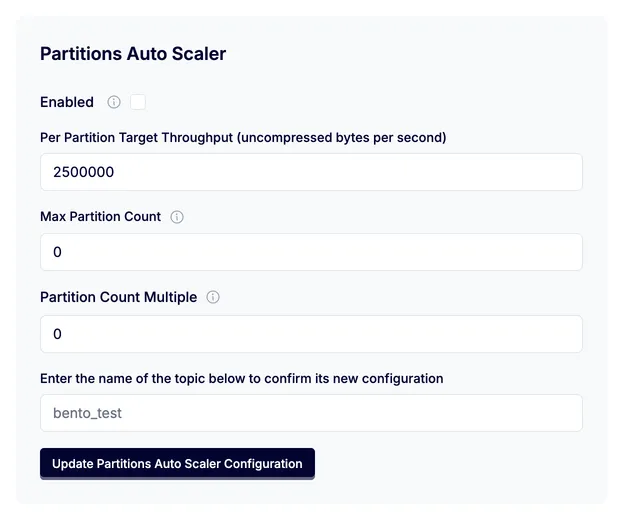
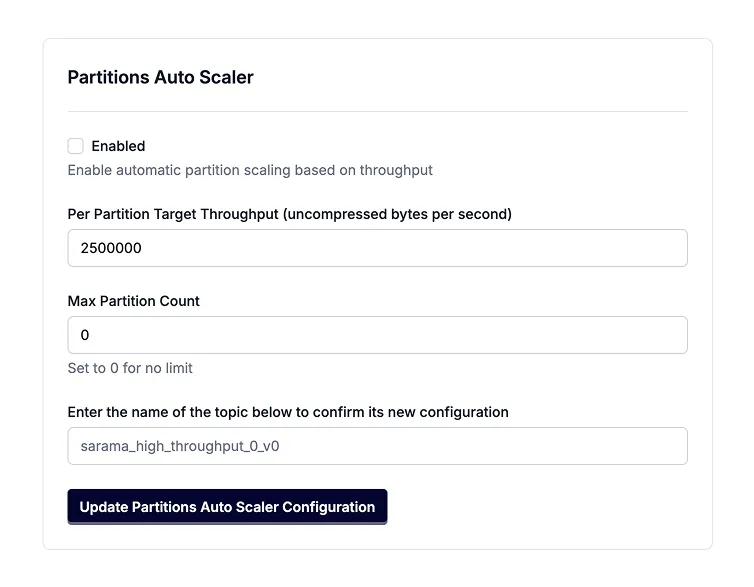
Integer value. Target throughput (in uncompressed bytes per second) for each partition in the topic. If average throughput per partition is below this value, the partitions auto-scaler will continue to add partitions to the topic until throughput per partition falls below this value or the max partitions limit is reached. For example, if this was set to |
warpstream. |
Maximum number of partitions beyond which the partitions auto-scaler will not add any more partitions to the topic, regardless of how high the throughput is. |
warpstream. |
Integer value. Constrains the partitions auto-scaler to only ever scale the topic to multiples of this number. A value of 0 or 1 disables the constraint. |
How to Edit Configuration
Section titled “How to Edit Configuration”There are two ways to enable / configure partitions auto-scaling on a topic:
- The WarpStream UI.
- The Kafka protocol’s AlterConfigs API.
WarpStream UI
Section titled “WarpStream UI”Click “Edit Configuration” for a topic, in the Topics view for your cluster, and then navigate to the “Partitions Auto scaler” section.
AlterConfigs API
Section titled “AlterConfigs API”Use a Kafka client / tool / UI of your choice that allows editing topic-level configuration values to update the configuration values described in the configuration section for your topic.
Enable Auto-Scaling By Default For New Topics
Section titled “Enable Auto-Scaling By Default For New Topics ”You can also configure cluster-level defaults so that newly created topics automatically inherit partitions auto-scaler settings.
Set the following broker configuration values:
| Configuration | Description |
|---|---|
| warpstream. |
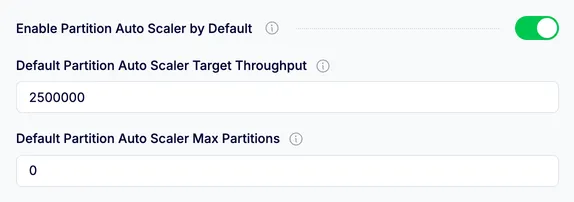
Boolean value. Enables topic-level partitions auto-scaling by default for newly created topics. |
| warpstream. |
Integer value. Default per-partition throughput target applied to newly created topics. |
| warpstream. |
Integer value. Default max partition count auto-scaler limit applied to newly created topics. |
| warpstream. |
Integer value. Default partition count multiple constraint applied to newly created topics. |
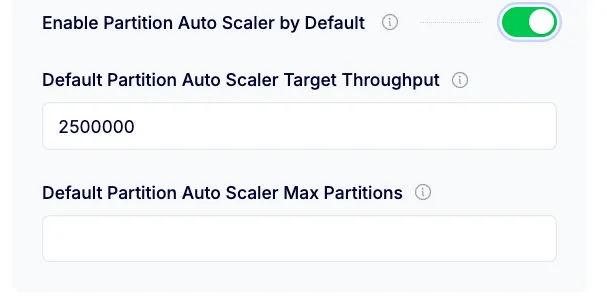
You can set these values either in the WarpStream UI (cluster configuration) or via broker configuration APIs / tooling. To set in the UI, please navigate to “Cluster Settings”, and set Enable Partition Auto Scaler by Default, Default Partition Auto Scaler Target Throughput, and
Default Partition Auto Scaler Max Partitions as desired.
With the WarpStream CLI, you can run the following commands for example:
- View current broker configuration:
warpstream cli describe-broker-configs -bootstrap-host HOST -bootstrap-port PORT- Update defaults:
warpstream cli alter-broker-config -bootstrap-host HOST -bootstrap-port PORT \  --add-config "warpstream.default.partitions_auto_scaler.enabled=true"
warpstream cli alter-broker-config -bootstrap-host HOST -bootstrap-port PORT \  --add-config "warpstream.default.partitions_auto_scaler.per_partition_throughput_uncompressed_bytes_per_second=2500000"
warpstream cli alter-broker-config -bootstrap-host HOST -bootstrap-port PORT \  --add-config "warpstream.default.partitions_auto_scaler.max_partition_count=1024"
warpstream cli alter-broker-config -bootstrap-host HOST -bootstrap-port PORT \  --add-config "warpstream.default.partitions_auto_scaler.partition_count_multiple=4"
If a topic explicitly sets its own partitions auto-scaler configuration, those topic-level values take precedence over these cluster defaults.